A rattling air conditioner, a whirring generator, the hum of a refrigerator. Any and all of these sounds can ruin an otherwise perfect take — and they can take hours to smooth out in post-production. As many a video creator can attest: white noise is the bane of sound editing.
Thankfully, Adobe Premiere comes with a powerful tool to help deal. It’s called the DeNoise effect and it’s one of our go-to’s because it seriously improves audio clarity. Watch the video above to see what DeNoise is all about, and read on for tips on how to avoid white noise in your video.
Plan for white noise during filming
There best way to deal with white noise in your audio track is to have as little of it as possible when you get to the editing bay. Unless you’re shooting in a vacuum (or big-budget studio conditions), you’re going to have some background noise on your audio. So plan for it. Before cameras roll, sweep your set and proactively eliminate unwanted noise. Close windows, unplug loud appliances, take your room tone, and position your microphone as close to your subject as possible.
DeNoise takes care of the rest
Sometimes you can take all the necessary steps during production, but noisy elements still wind up in your edit. This is where the DeNoise effect comes in handy. This powerful tool removes unwanted frequencies from your background audio. And, while this once was a tough-to-perfect technique, Adobe recently improved the feature, making it easy and accessible for all editing levels.
How we use DeNoise at Vimeo
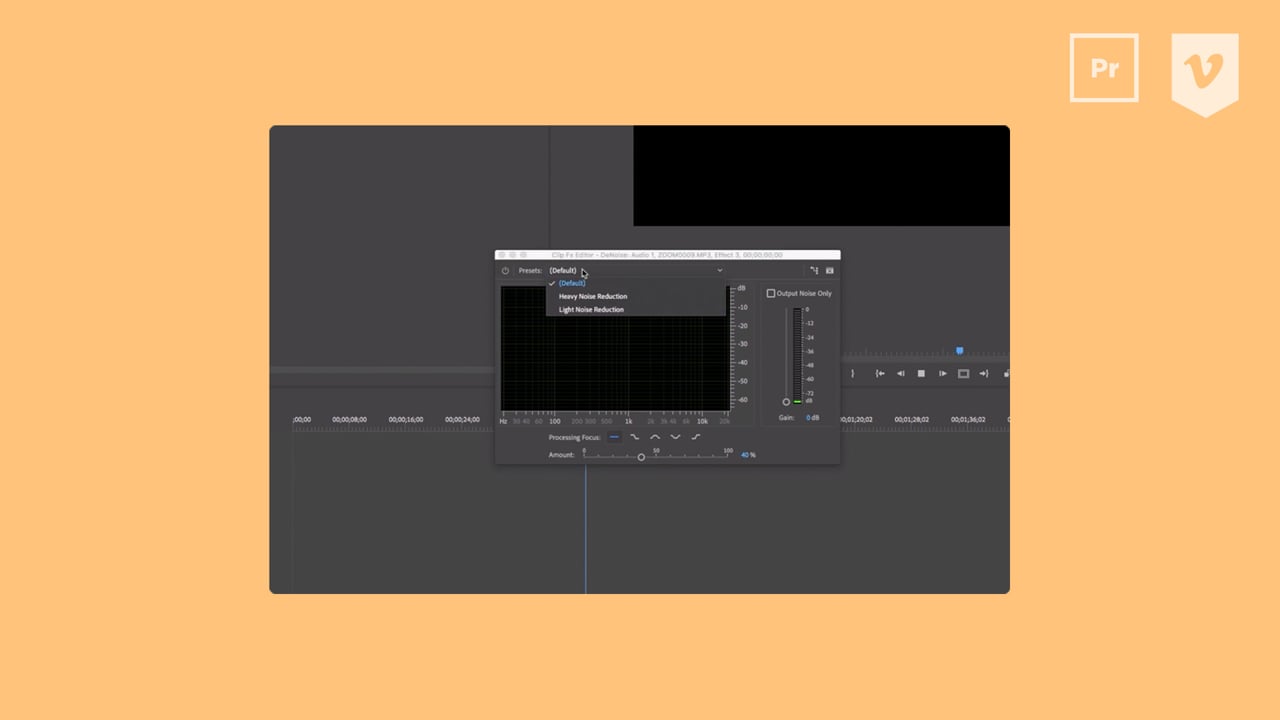
In post-production, we utilize the Heavy Noise or Light Noise Reduction, depending on the amount of noise we need to eliminate for crisp audio. You’ll find those options in the Presets dropdown menu, within the DeNoise custom setup window.When dealing with something like a buzzing light bulb, set the Processing Focus to Higher Frequencies (the icon furthest to the right). Be prepared to tweak your DeNoise settings, and play with your Parametric Equalizer until you have your track sounding pitch perfect.
Less is more
While DeNoise expertly smooths out unwanted frequencies, it also impacts the quality of your clip’s vocals. Make sure you only utilize it when you need white noise reduction. And again, the best way to deal with white noise in your video is to eliminate it during filming. More Video School lessons
Vimeo offers creators tools for video hosting, a text-based video editor, timeline editing features, video graphics capabilities, and an image-to-video converter.